
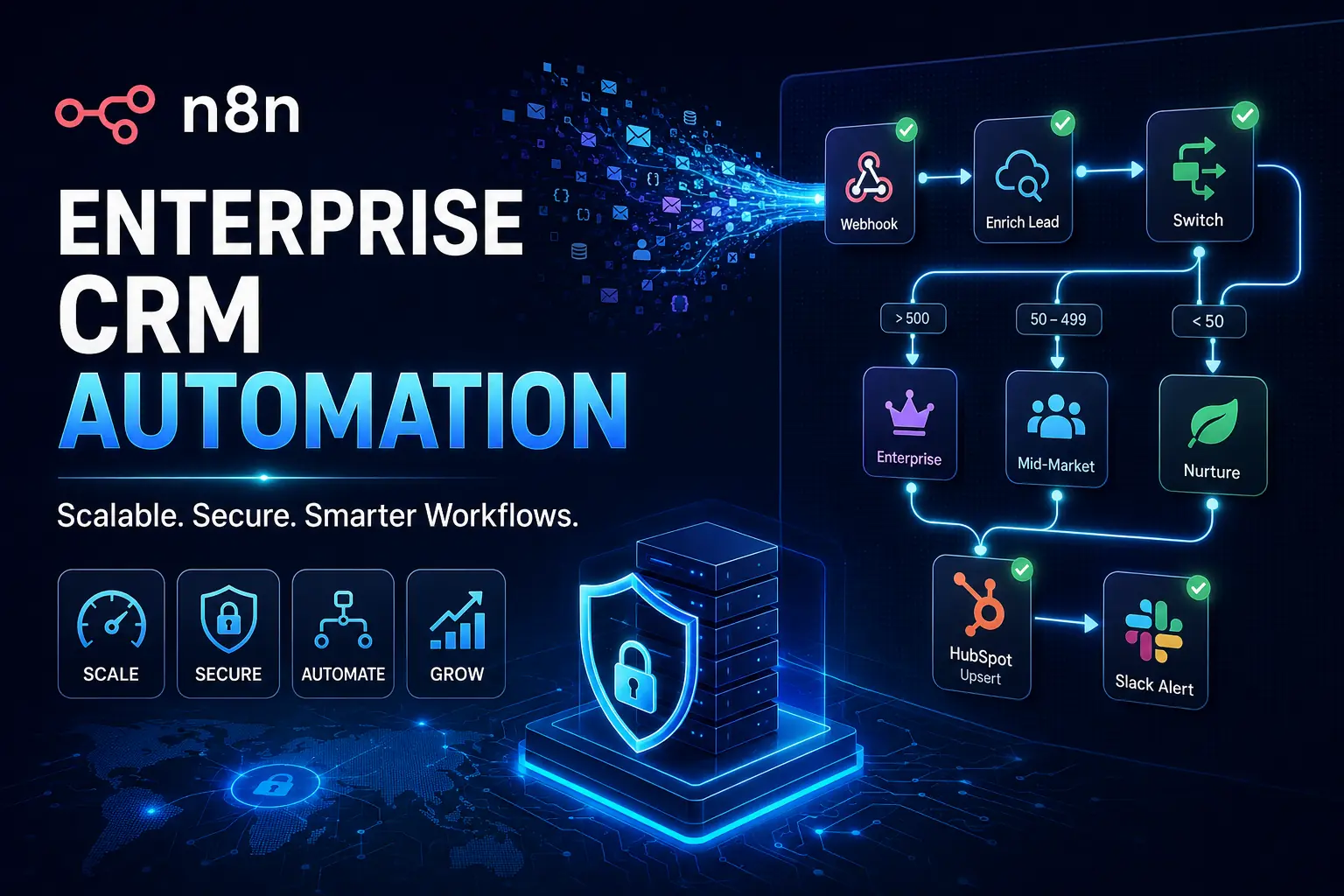
If you’re reading this, you’ve likely hit the wall. Your operations team probably started out with a simple, drag-and-drop integration tool just to push a handful of leads from a web form into your sales pipeline. At first, it felt like magic. But as your business scaled, that magic quickly mutated into a massive liability. You’re now managing workflows that look like a plate of spaghetti, staring down monthly software bills that rival a junior developer’s salary, and dealing with silent failures that actively cost your sales team closed-won revenue.
Building robust n8n CRM automation is no longer about just connecting App A to App B. It’s about engineering scalable, resilient systems capable of handling complex conditional logic, heavy data payloads, and ruthless security compliance. For high-growth SMBs, technical founders, and serious RevOps teams, the migration away from consumer-grade integration platforms (iPaaS) toward enterprise-grade workflow orchestration isn’t a luxury. It’s inevitable.
Consider this guide your definitive playbook for making that transition. We’re going to tear down exactly how to move past the bottlenecks of standard tools and architect highly reliable, endlessly scalable, and cost-efficient workflows.
The Breaking Point: Why RevOps Teams Outgrow Mainstream iPaaS
Every technical operations unit eventually hits a ceiling where their current tech stack restricts their growth instead of fueling it. Recognizing when you’ve hit this breaking point is the very first step in building real infrastructure.
The Task-Limit Extortion
The quickest, most painful realization that you’ve outgrown your basic automation tool is the pricing model. Platforms like Zapier or Make rely heavily on task-based or step-based billing. When you’re processing a few hundred leads a month, you barely notice it. But what happens when you introduce automated data enrichment, multi-stage routing, and continuous bidirectional database syncing?
Suddenly, updating a single lead might burn through 15 to 20 “tasks.” If your company scales from 500 to 5,000 leads a month, and you run a polling trigger that checks for updates every five minutes, your task count goes nuclear. High-growth businesses regularly find themselves slammed with four-figure monthly invoices simply because they are checking for changes in their own database or iterating over a list of contacts. Let’s be blunt: it feels less like paying for software and more like paying a toll tax for every byte of data moving through your own pipeline.
The Fragility of Linear Workflows
Consumer-grade solutions are beautifully designed for linear, one-to-one data pushes. The problem? Real-world business logic is never linear.
When you try to build complex conditional routing, error handling, or array manipulation inside a basic visual builder, the workflow becomes dangerously fragile. A tiny change in an incoming webhook payload maybe marketing added a new UTM field to a form can silently snap the entire sequence. Because consumer platforms often hide the raw data from you, debugging an API timeout or a malformed text string turns into a complete nightmare. The pipeline breaks, no alerts go off, and three days later, a sales director realizes dozens of high-value enterprise prospects were never routed to the team.
The Data Privacy Ultimatum
For agencies managing client databases or technical founders operating in regulated spaces like fintech, insurtech, or healthcare, routing Personally Identifiable Information (PII) through a shared, multi-tenant cloud environment is a massive compliance hazard.
Sending customer emails, direct phone numbers, and financial details through a black-box third-party server directly violates the data governance policies demanded by enterprise clients. The inability to deploy most automation platforms inside your own Virtual Private Cloud (VPC) forces teams into a terrible corner: either risk compliance breaches, or waste months building custom, hard-coded integrations from scratch. That entirely defeats the purpose of having an agile RevOps team in the first place.
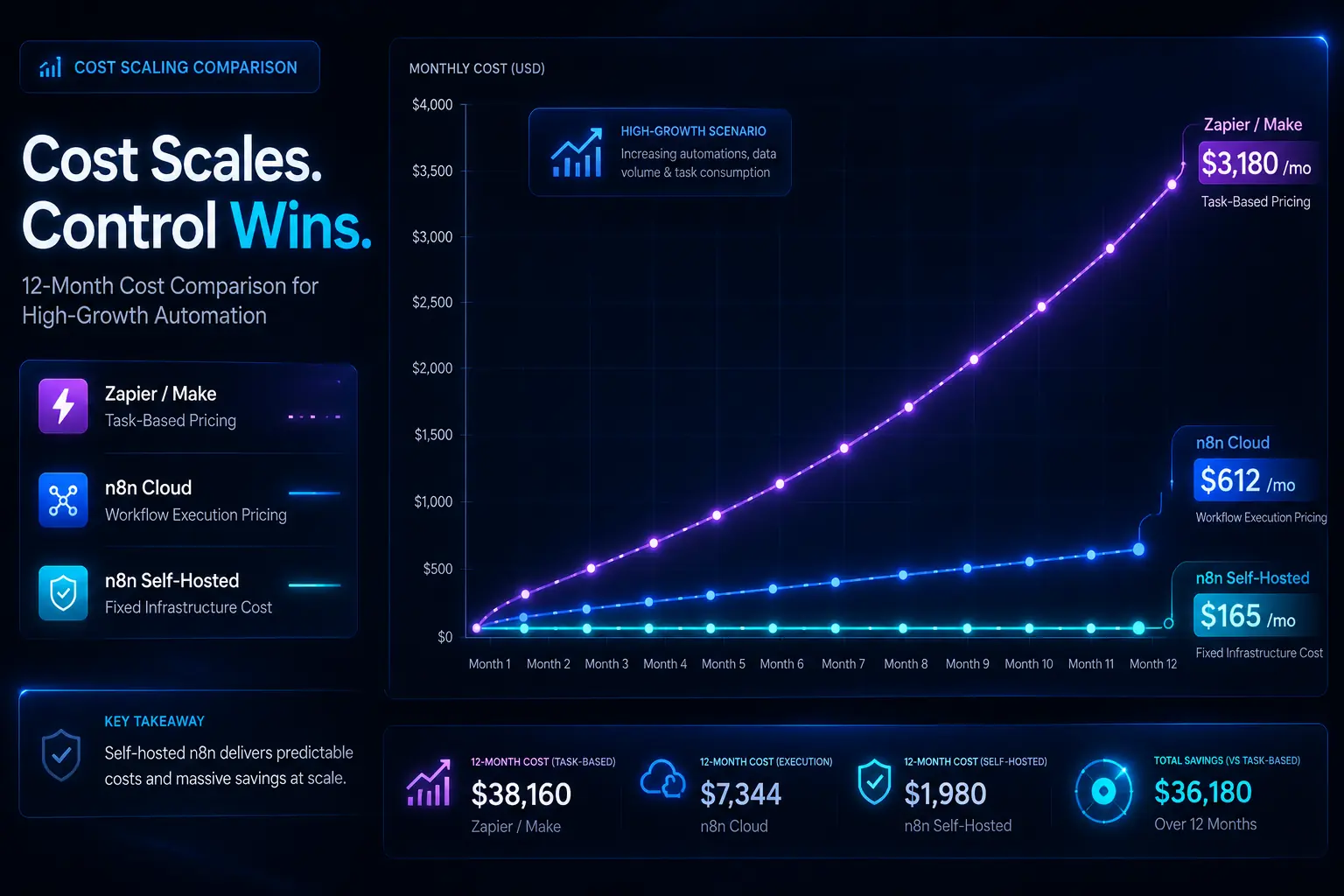
We redesigned the data pipeline for a fast-growing B2B SaaS company that was severely bottlenecked by their legacy iPaaS. Before the migration, their 112-step lead routing and enrichment sequence was costing them $3,180 per month, with a silent failure rate hovering around 8.4%. After migrating their core n8n CRM automation to a self-hosted instance, monthly infrastructure costs dropped to roughly $165, and workflow failure rates plummeted to 0.7%, drastically improving pipeline reliability and saving thousands in operational overhead.
We design AI agents, Custom AI Chatbot and n8n Workflow Automation systems that replace manual business operations with intelligent, scalable workflows.
Unlocking n8n: Architectural Superiority for CRM Automation
To fix these deep systemic issues, you have to fundamentally change how you view automation architecture. n8n doesn’t just give you a different drag-and-drop screen; it processes logic and data in a way that directly aligns with actual software engineering principles.
Fair-Use Execution vs. Per-Task Pricing
The biggest disruption n8n brings to the table is its execution model. Instead of taxing you for every single step, filter, or router a piece of data passes through, n8n generally focuses on workflow executions as a whole.
If you need to pull a list of 500 contacts from your CRM, run them through an external enrichment API, format the text arrays, and push the clean data into a reporting dashboard, traditional platforms charge you for thousands of individual tasks. In n8n, the emphasis is on the overall run. This allows Solutions Architects to actually build workflows the right way complete with necessary data formatting, strict error checking, and complex routing logic without the constant anxiety of blowing up the monthly billing limit. You’re finally free to manipulate heavy data arrays without a financial penalty.
The Power of the Canvas + Code
Visual builders are great for rapid prototyping, but they strictly limit you to whatever the pre-built modules allow. If an integration module is missing a specific API endpoint, or if you need to run a complex math calculation on a dataset, visual-only platforms leave you completely stranded.
n8n solves this by utilizing a hybrid approach. It gives you the visual canvas for fast deployment, but it embeds a fully functional Code node right in the mix. You can write custom JavaScript or Python natively within the workflow. This means if you need to execute a nasty regex operation, transform a heavily nested array of objects, or run a proprietary scoring algorithm, you just drop in a Code node and script it out. You get the speed of no-code combined with the absolute power of custom code.
JSON at the Core
Under the hood, n8n treats absolutely everything as a JSON object. While other platforms try to hide the raw code behind locked user interfaces and friendly dropdowns, n8n exposes the exact JSON payload to you.
Treating CRM data as raw JSON gives you total control over how data is mapped. You can use JMESPath or standard JavaScript expressions to query, filter, and extract exactly what you need from deeply nested payloads. When a webhook hits, you see the exact structure the source system delivered. This transparency is mandatory for fast debugging. It allows technical users to build highly resilient integrations because they are touching the actual data structure, not a platform’s abstracted guess of it.
Self-Hosted vs. Cloud (The Privacy Factor)
n8n gives you deployment flexibility, which entirely changes the game for data privacy.
For teams that just want speed and zero maintenance, n8n Cloud delivers a fully managed, reliable environment. But for technical founders and B2B agencies managing strict compliance requirements (GDPR, HIPAA, SOC2), the ability to self-host n8n is its biggest competitive advantage.
Deploying n8n via Docker onto your own AWS, Google Cloud, or Azure infrastructure means the data never leaves your Virtual Private Cloud. Your CRM records, customer PII, and sensitive API keys stay entirely inside your controlled walls. You own the server, you hold the logs, and you dictate the security protocols.
Designing the Data Ingestion Layer: Webhooks & Rate Limits
Before you can orchestrate any fancy logic, you have to get data into your system safely. The ingestion layer is exactly where most amateur automations collapse under pressure. Engineering a robust entry point is the secret to long-term stability.
Securing Your Webhooks
Moving to an enterprise-grade mindset means killing off open, unprotected endpoints. If you expose a standard webhook URL to the public internet without proper security, it’s only a matter of time before it gets hammered by spam bots, sloppy internal tests, or malicious payloads, absolutely trashing your CRM data.
In n8n, the Webhook node lets you enforce strict security right at the front door. You can easily set up header authentication, requiring a specific API key to be passed inside the incoming request. You can take it further by utilizing execution logic to run IP allowlisting checking the incoming IP address against an approved list and instantly rejecting unauthorized traffic before it ever hits your routing logic.
Handling API Rate Limits (The Pro Approach)
One of the most frequent causes of silent automation failures is hitting API rate limits. Let’s say a major marketing campaign generates 2,000 leads in an hour. If your workflow tries to shove all 2,000 into Salesforce or HubSpot at the exact same time, the CRM API is going to throw a 429 Too Many Requests error. Standard automation platforms will crash, and those prospects are gone forever.
To prevent this, professionals lean on n8n’s Loop node (formerly Split in Batches). This node lets you take a massive chunk of incoming data and slice it into manageable pieces.
You can set the workflow to process 50 records at a time, wait for a programmed duration, and then move to the next batch. This throttles your CRM API requests, keeping you comfortably under your provider’s limits and guaranteeing that massive lead imports happen consistently, without triggering temporary bans or dropping payloads.
Understanding the Raw Ingestion Structure
To truly see how n8n handles data, look at a standard incoming webhook from a complex SaaS application. Instead of messing with visual mapping fields, you operate directly on the raw structure.
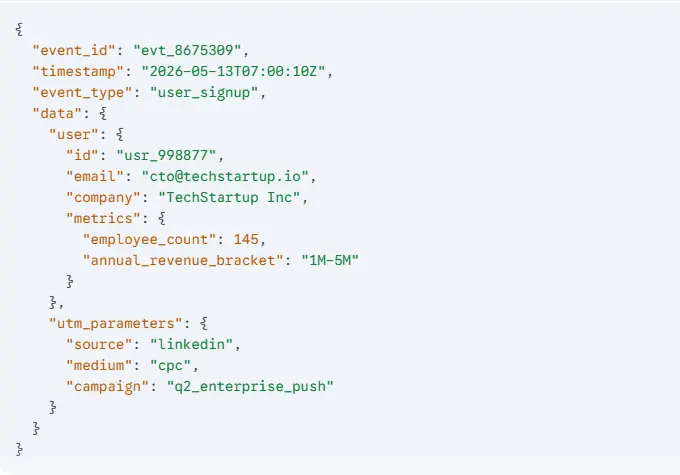
Because n8n embraces this JSON structure natively, pulling the employee count to build routing rules is as simple as calling {{ $json.data.user.metrics.employee_count }}. You aren’t guessing how the tool interpreted the nested object; you have direct, programmatic access to the truth.
Blueprint 1: Multi-Stage Lead Routing & Automated Enrichment
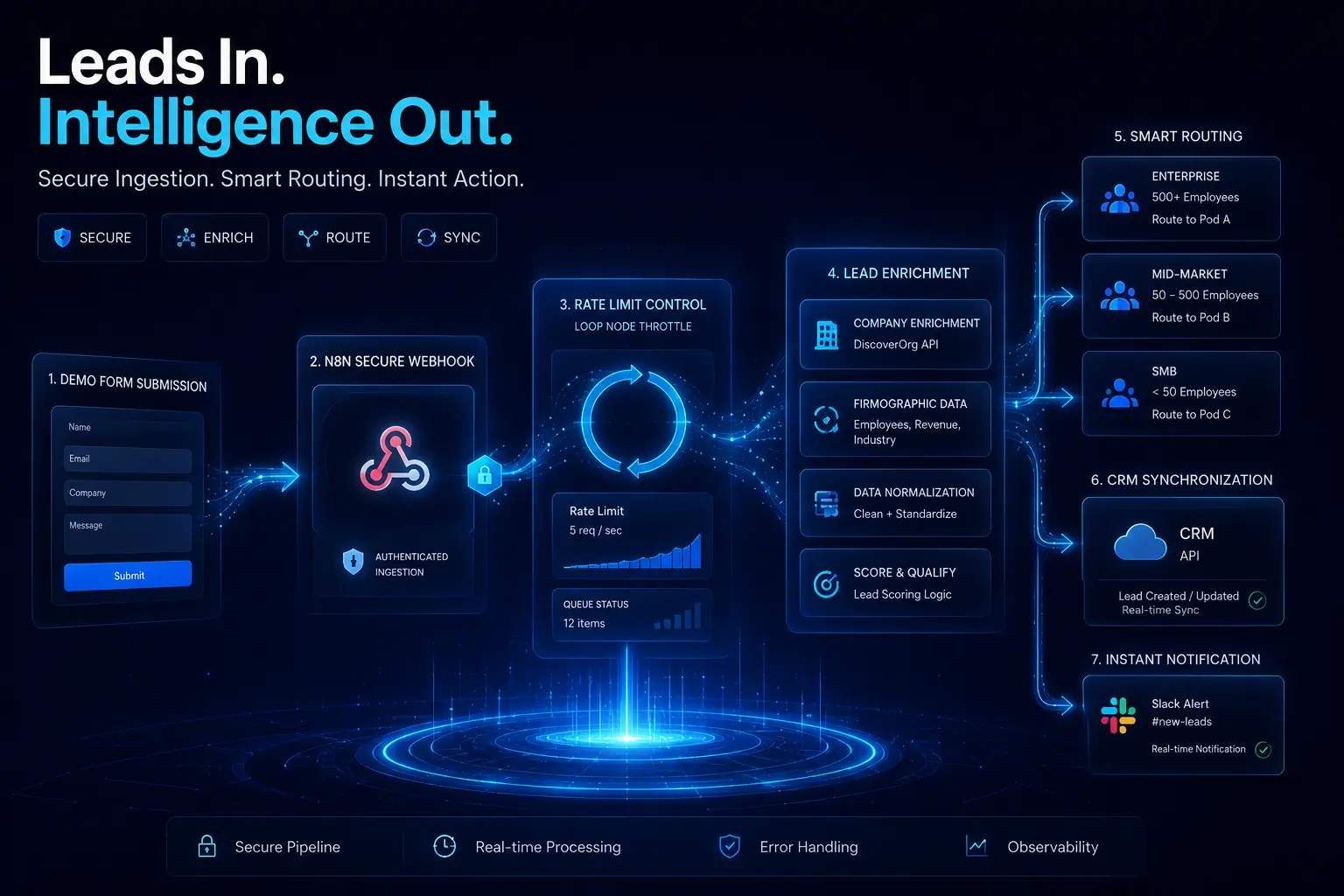
Let’s step out of the theory and look at a practical, high-value blueprint. This is the exact type of n8n CRM automation that drives revenue and replaces the weak, single-step templates floating around online.
The Scenario
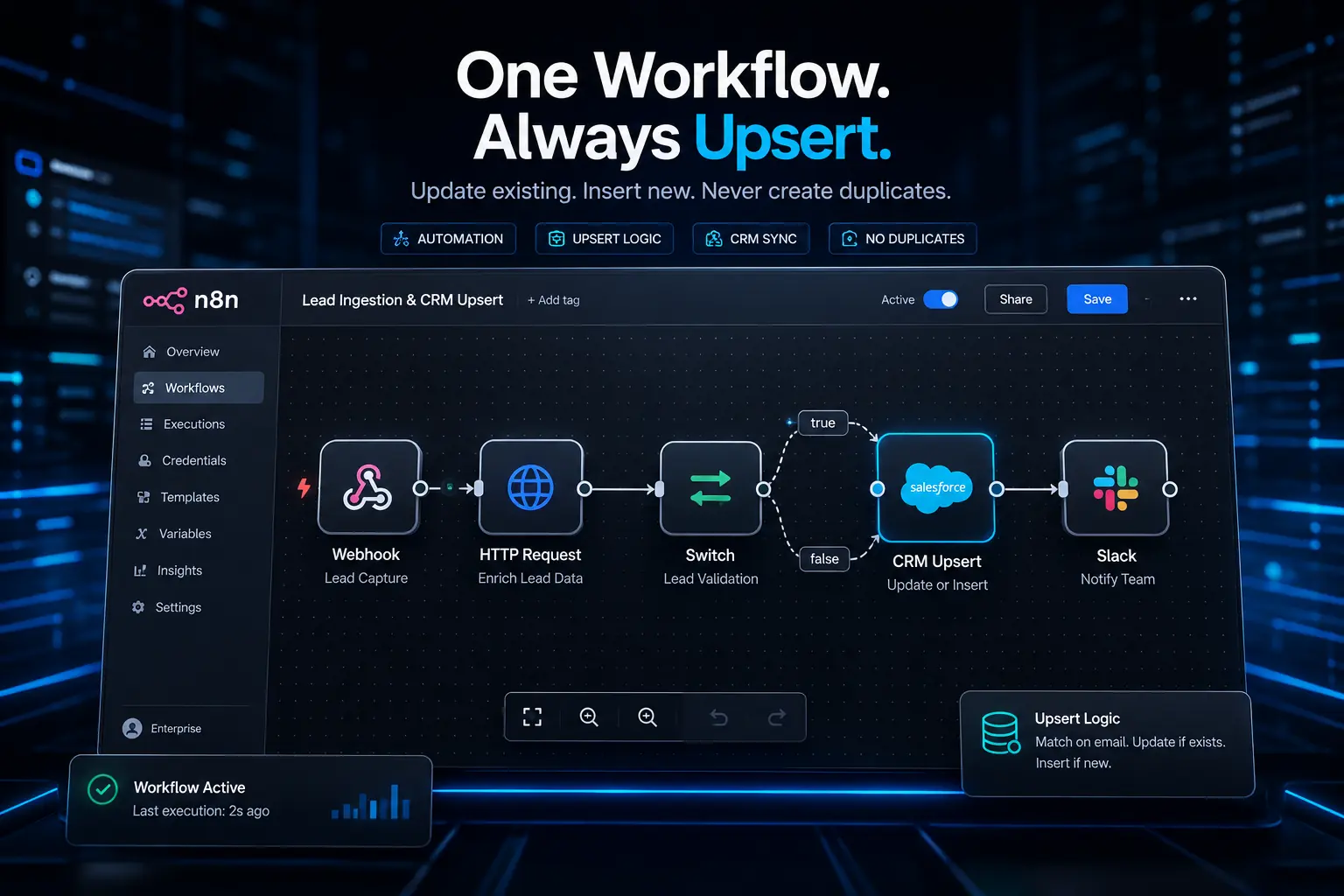
An inbound lead hits via a demo form submission. You can’t just dump this raw information straight into the CRM. You need to enrich the profile to find out the company’s size, route the prospect to the right sales pod based on that exact data, push the polished record to the CRM, and ping the right Slack channel so your reps can strike while the iron is hot.
The Node Sequence
Building this in n8n requires a clean, logical flow of nodes acting as your digital RevOps manager.
-
Webhook Node: This is the secure catcher. It waits for the POST request from your form provider and grabs the raw JSON payload with the lead’s email and name.
-
HTTP Request Node (Enrichment): Before doing anything, we need context. We set this node to hit an external enrichment API like Clearbit or Apollo.io, feeding it the lead’s email domain. The API hands back a rich dataset with the company’s industry, HQ location, and importantly, their employee count.
-
Switch Node (The Brain): This is where real decisions are made. The Switch node handles the heavy “if-then-else” logic. We establish routing rules off the enriched data.
-
Route 0: IF employee_count is greater than 500, push the payload to the Enterprise Sales path.
-
Route 1: IF employee_count is between 50 and 499, push it to Mid-Market.
-
Route 2: IF employee_count is less than 50, route it straight to an automated marketing nurture sequence.
-
-
CRM Node (HubSpot/Salesforce): For the qualified routes, the payload finally hits the CRM. We map the original form data plus the newly acquired enrichment metrics to build a bulletproof prospect profile.
-
Communication Node (Slack): A tailored alert is sent to a specific Slack channel (e.g., #enterprise-leads), tagging the assigned account executive with the lead’s enriched context.
Pro-Tip on Upserting
When you interact with the CRM node, never use a basic “Create” function. Always utilize “Upsert” (Update or Insert) logic.
If you use “Create,” and that exact lead exists in your system from an ebook they downloaded last year, you’ve just created a duplicate. That pollutes your database and fragments the customer journey. “Upsert” uses a matching key almost always the email address. The node searches the CRM for that email first. If it’s there, it updates the existing record with the new data. If it isn’t, it creates a fresh record. That discipline is exactly what separates amateur scripts from enterprise architecture.
Blueprint 2: Achieving Bidirectional CRM Sync (Without Infinite Loops)
Hooking a form to a CRM is entry-level stuff. Syncing two entirely separate databases bidirectionally where updates in System A instantly reflect in System B, and vice versa is one of the hardest challenges in operations.
The Problem
Imagine your primary CRM (Salesforce) needs to be in perfect harmony with a secondary platform, like a proprietary billing software or Jira. If a rep updates an address in Salesforce, the billing system needs it. If accounting updates it in billing, Salesforce needs to mirror it.
The Infinite Loop Danger
The rookie approach is putting webhooks on both ends. Salesforce pings the billing system, and the billing system pings Salesforce.
Here’s why that fails: A rep updates Salesforce. The webhook fires, updating the billing system. The billing system registers an update, which fires its own webhook back to Salesforce. Salesforce sees an update, and fires back. You’ve just engineered an infinite loop. In a matter of minutes, your APIs will crash, you’ll burn through your rate limits, and your databases will be drowning in duplicate requests.
The n8n Solution: State Management & Hash Checking
To engineer a real bidirectional sync, you have to introduce state management. You need a way to verify if an update is a genuinely new change, or just an echo from a previous sync.
In n8n, we conquer this by using data hashing and a lightweight database.
-
Catch and Hash: When the payload hits from Salesforce, we push it through n8n’s Crypto node. We tell the node to generate an MD5 hash of the data. An MD5 hash acts as a unique digital fingerprint for that exact string of data.
-
State Check: We then use a database node (Redis is blazing fast, but Airtable or SQL works too) to look up the ID of that specific record. We compare the incoming MD5 hash against the hash we already have on file.
-
Halt or Proceed: If the hashes match, the data hasn’t actually changed; this webhook is just an echo. We drop an IF node to immediately kill the workflow execution. If the hashes do not match, it’s a real, new update.
-
Update and Store: We proceed to update the secondary system, and most importantly, we overwrite the old hash in our Redis database with the new MD5 hash.
During a massive data migration for a fintech client, we inherited a poorly architected bidirectional sync between HubSpot and a custom loan management platform. A single phone number update triggered a violent infinite loop, firing over 16,400 webhook requests in under two hours and completely taking down the loan platform’s API. By wiring up an MD5 hash-checking sequence in n8n, we instantly killed the echo loops. The sync now runs completely silently, only executing API calls when data values actually change, cutting unnecessary API traffic by 94%.
Bulletproofing Your Workflows: Global Error Handling & Retries
A workflow is only valuable if it can recover from failure. In an enterprise setting, it’s never a matter of if an external API will time out; it’s a matter of when. Your infrastructure has to be bulletproof.
The “Error Trigger” Node
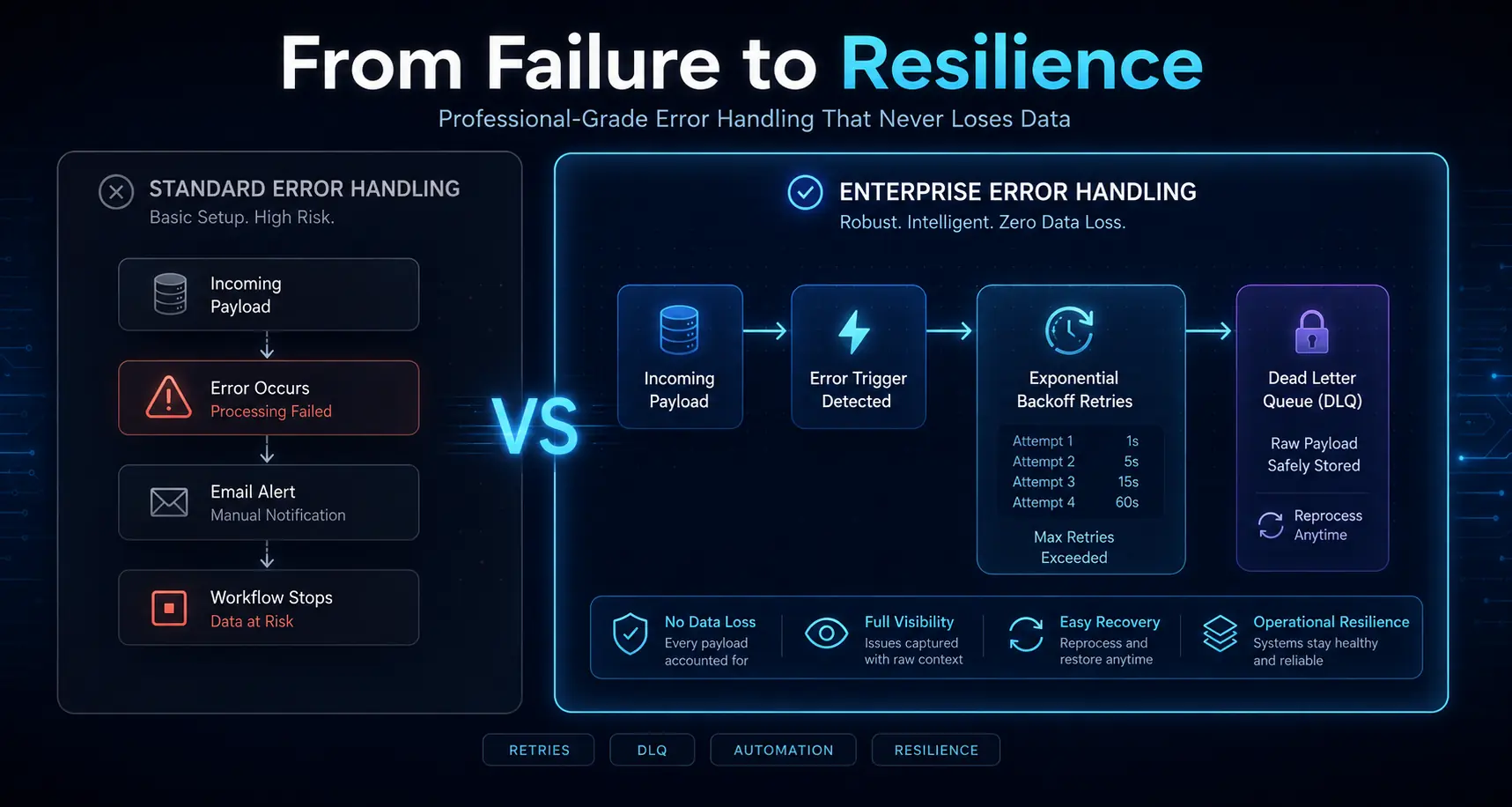
n8n features an incredible concept known as the Error Trigger node. Instead of hardcoding messy error logic into every single workflow, you build one master “Error Catcher” workflow.
You configure your core CRM workflows to automatically route to this Error Catcher if they fail. If any node in your pipeline breaks say the enrichment API goes down the master error workflow instantly triggers. It grabs the workflow name, the execution ID, the exact node that crashed, and the raw error response, sending a beautifully formatted alert straight to your engineering team’s Slack or PagerDuty.
Automated Retry Logic
Not all errors are fatal. Most are just transient hiccups, like the 429 Too Many Requests or a temporary 500 Internal Server Error from a SaaS vendor.
Instead of letting the workflow die, robust architecture uses automated retry logic. In n8n, you catch the error and push the payload to a Wait node. You set up exponential backoff: tell the system to wait two minutes, then retry the API call. Fails again? Wait five minutes and retry. Fails a third time? Wait fifteen minutes. This level of resilience ensures that minor server blips don’t result in permanently lost prospects.
Dead Letter Queues
But what happens when an API goes down for a whole day, or a payload is genuinely broken and impossible to process? You can never, ever lose the raw data.
That’s where Dead Letter Queues (DLQs) come in. If a payload burns through all of its retries, the final step in your error handling should be pushing that raw, unprocessed JSON directly into a secure holding pen. This could be an Airtable base, a secure Google Sheet, or an AWS SQS queue.
By routing failed records to a DLQ, your engineers can log in the next morning, review the raw JSON, fix the root cause, and manually re-inject those exact leads right back into the pipeline. Nobody slips through the cracks.
Migration Strategy: Moving from Zapier/Make to n8n
Migrating your company’s entire operational backbone is intimidating. Trying a “rip and replace” strategy overnight usually results in a catastrophic mess. A disciplined, phased rollout is how you succeed.
Audit & Triage
Do not migrate everything at once. Start by running a brutal audit of your current workflows. Identify the top 10% to 15% of your automations that process the highest data volume and rack up the highest monthly billing costs.
Usually, this means heavy data ingestion, massive database syncs, and large-scale email sequencing. Move these high-volume pipelines to n8n first. You’ll see massive financial savings and performance upgrades immediately, which validates the project to your stakeholders while you leave the low-volume, legacy processes running in the background for later phases.
Standardizing Naming Conventions
Because n8n lets you build incredibly complex visual systems, readability is non-negotiable. If your solo RevOps manager builds a massive web of nodes and then leaves the company, the rest of the team needs to be able to read the map.
Set strict naming rules for your nodes right away. Don’t just leave a node called “HTTP Request.” Rename it so it explicitly states its job: [SYS] Clearbit API -> [ACT] Get Company Data. Drop text notes onto the canvas to visually group phases together (e.g., “Ingestion Phase,” “Enrichment Phase”). Treat your visual canvas with the exact same respect you would give a neatly commented codebase.
Testing in Production
One of the best features for a smooth migration is n8n’s data pinning. When you’re replicating a workflow, you can capture a real, complex JSON payload from your live, production system and “pin” it to the trigger node inside n8n.
This lets you test the entire pipeline, refine your custom code, and verify payload formatting using real-world data without sitting around waiting for a live event to trigger. You iterate safely in a staging environment until the final output is flawless, guaranteeing a seamless cutover when you finally hit “Active.”
n8n CRM Automation FAQ’s
Can n8n completely replace Zapier for CRM automation?
Yes. For technical teams and RevOps professionals, n8n is a complete replacement that provides vastly superior logic control and flat cost scaling. That said, for solo non-technical users looking for simple two-step triggers, Zapier’s learning curve is admittedly lower.
How does n8n handle HIPAA/GDPR compliance for CRM data?
n8n dominates in compliance because of its self-hosted model. By running n8n via Docker on your own AWS or Google Cloud servers (inside your VPC), your sensitive prospect data never touches a third-party vendor’s servers.
What is the best way to handle large data migrations in n8n?
To keep from nuking your APIs during massive data moves, use n8n’s Loop node (Split in Batches). This chunks massive datasets and paces your API requests to avoid rate limits. For enterprise volume, skip REST APIs entirely and connect n8n directly to your SQL databases.
Does n8n require coding skills to use effectively?
No, you don’t strictly need to code. n8n offers a visual drag-and-drop UI for standard work. But let’s be real knowing basic JavaScript or JSON unlocks the actual power of the platform, letting you execute complex transformations inside the Code node.
How do I avoid duplicate leads in my CRM using n8n?
Always build your CRM nodes to execute “Upsert” (Update/Insert) logic instead of basic “Create” commands. By assigning a unique matching key usually the email address n8n will seamlessly update existing files instead of spawning duplicates.
Can n8n connect to on-premise databases securely?
Absolutely. Because n8n can be self-hosted securely inside your internal network, it connects straight to internal, on-premise databases like PostgreSQL, MySQL, or MongoDB without exposing those servers to the public web.
What happens if my CRM API goes down while n8n is running?
If built right, n8n handles downtime flawlessly. You set up Wait nodes to run exponential backoff (retrying the API connection at expanding intervals) and route any permanently failed data directly to a Dead Letter Queue (like an Airtable base) so zero data is lost.
Is n8n Cloud significantly different from self-hosted n8n?
The core processing engine and visual UI are exactly the same. The difference is strictly infrastructure. n8n Cloud is managed for you, whereas self-hosted means your engineers handle the servers and security in exchange for total data privacy.
How do you debug a failed workflow execution in n8n?
n8n gives you an Executions tab that logs the exact journey your data took. You can click the specific node that failed, look at the raw JSON payload in that split second, and read the direct error message from the external API, which makes debugging incredibly precise.
