
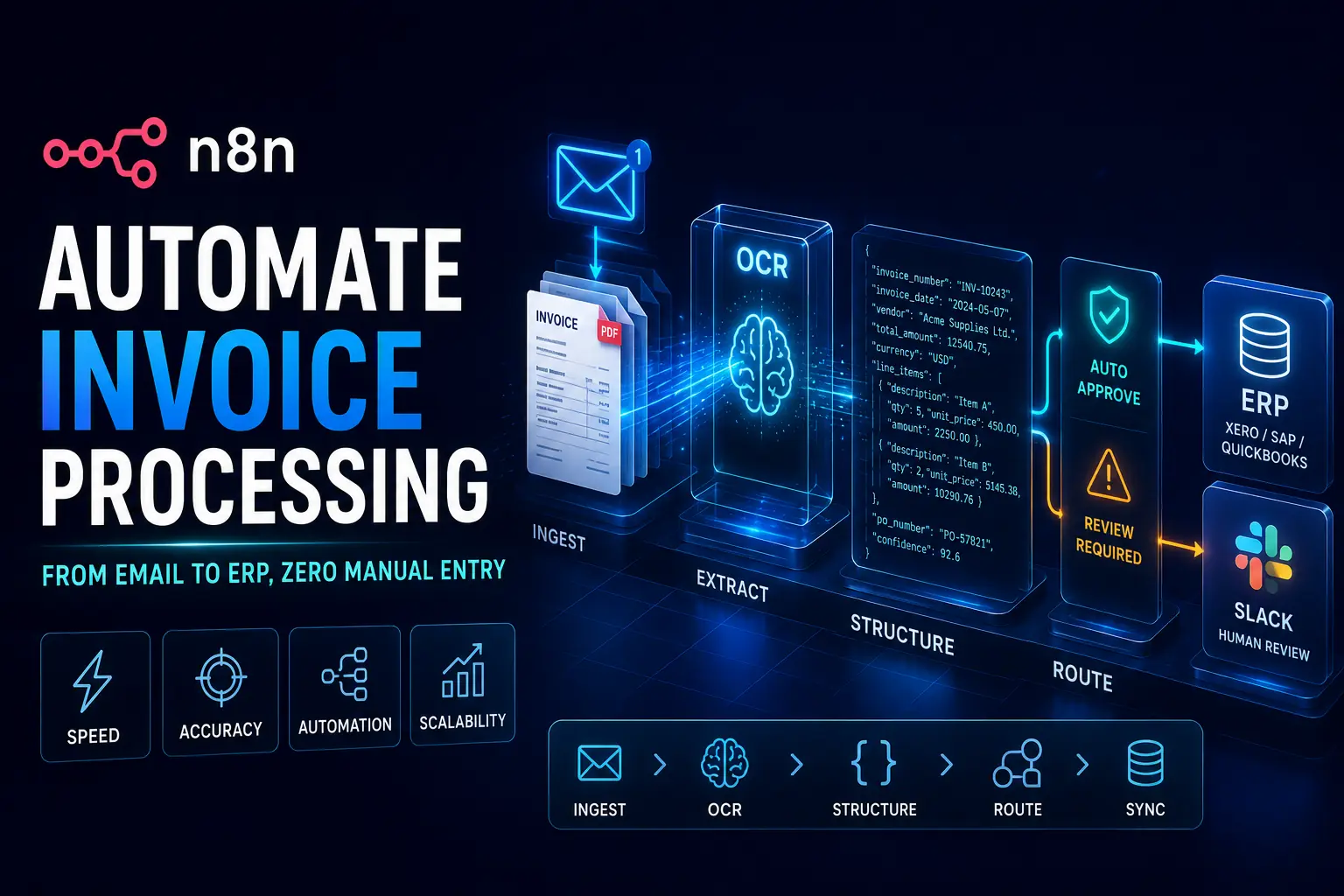
Manual data entry is a quiet profit killer for operations managers and finance teams globally. Every single day, your staff burns hours manually typing data from PDF attachments into accounting platforms. Along the way? They risk costly human errors.
If you want to automate invoice processing n8n is hands down one of the smartest platforms you can leverage. A lot of businesses just assume they have to buy expensive, enterprise-grade SaaS tools to manage high-volume financial documents. That’s simply not true.
You can actually build a highly scalable, self-hosted system that crushes thousands of invoices for pennies on the dollar. By the end of this guide, you’ll have a complete blueprint to construct an advanced workflow using n8n, heavy-duty OCR, and custom logic routing.
Why This Matters
Switching from tedious manual entry to automated JSON payloads completely redefines how your finance department runs. Instead of treating talented staff like human calculators, they get to focus on actual strategy and growth.
On a pure business level, setting up a self-hosted automation system aggressively cuts your operating expenses (OPEX). You stop bleeding money on per-task fees charged by cloud automation platforms and finally take total ownership of your data.
Emotionally? You free your developers and operations teams from soul-crushing, repetitive work. Morale naturally spikes when your best people solve complex business problems rather than copying and pasting line items for eight hours a day.
Core Problem Deep Dive
So, why is invoice processing so incredibly hard to automate? The root issue is the chaotic variety of formats. You are constantly dealing with unpredictable PDF layouts, blurry scanned images, random handwritten notes, and completely unstructured data.
Most teams try to throw standard cloud tools like Zapier or Make at the problem. While those are great for basic tasks, they absolutely break at scale. When you start pushing thousands of global documents through them, that per-task pricing gets ugly fast, and building complex routing logic turns into a nightmare.
Another massive mistake is relying on basic text extraction instead of AI-powered Optical Character Recognition (OCR). Standard parsers fall apart the second a vendor tweaks their invoice template. To actually pull this off, you need dedicated OCR engines like Mindee or Taggun that understand the actual context of the document.
Step-by-Step Solution: The n8n Workflow Blueprint
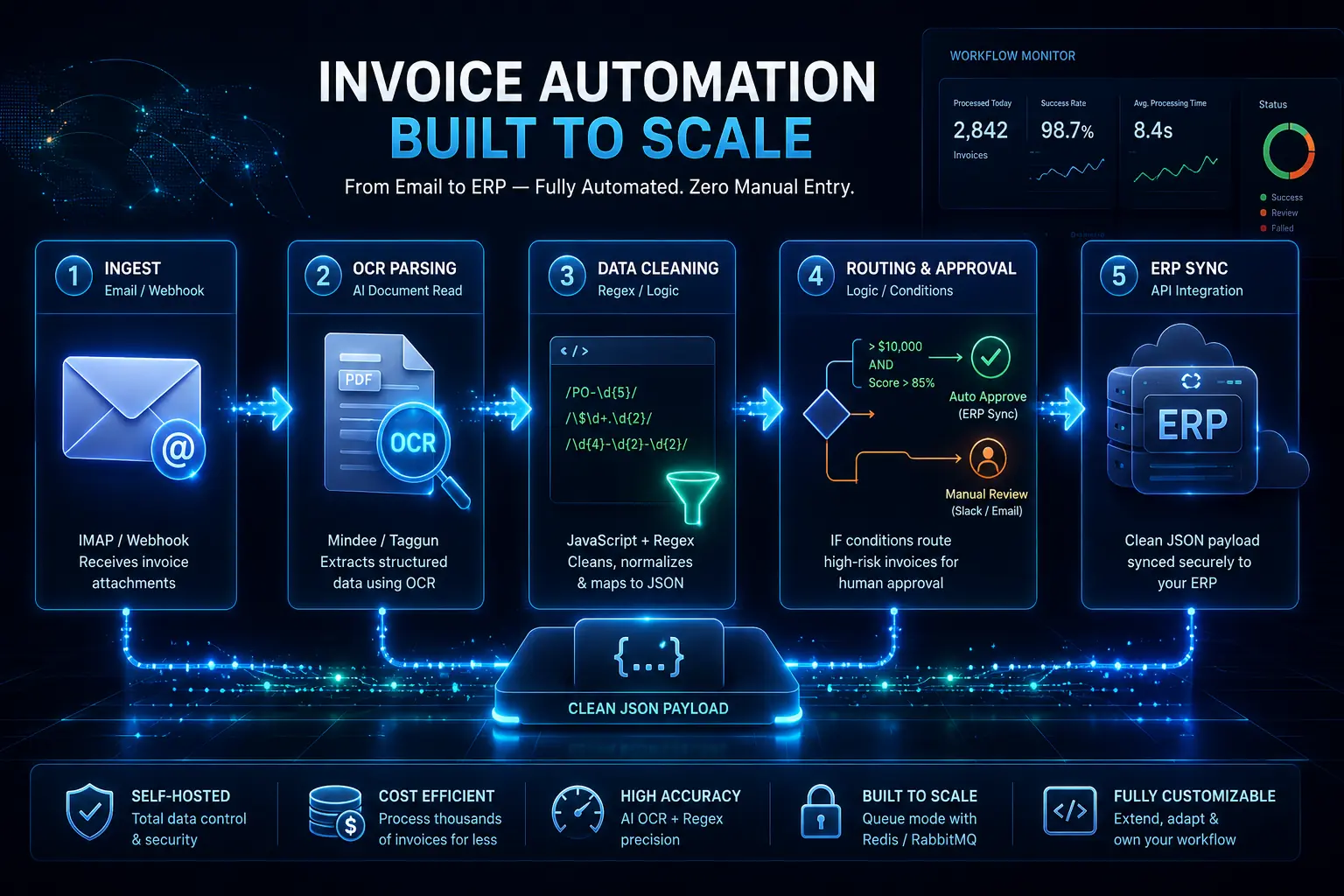
To automate invoice processing with n8n seamlessly, you need to trigger a workflow via an email webhook, pull the text using an OCR node like Mindee, structure the data via a JavaScript node with Regex, and then route that clean JSON payload straight into your ERP.
Step 1: Ingestion & Trigger (Email/Webhook Node)
Your automation has to start somewhere. The absolute easiest way to catch incoming invoices is by dropping an IMAP node into n8n and hooking it up to your accounts payable inbox.
Or, you can run a Webhook node. If you pull invoices from a customer portal or a secure file drop, just set up a webhook to catch those PDF attachments the exact second they upload.
Step 2: Data Extraction (OCR Node Integration)
Once n8n catches the PDF, it has to actually read the thing. You’ll use an HTTP Request node to securely pass the document payload to a high-end OCR API, think Mindee or Taggun.
Make sure your authentication headers are perfectly dialed in here. The OCR engine scans the file and fires a structured data packet right back to your n8n workflow.
Step 3: Data Cleaning & JSON Mapping (Code/Regex Node)
Here’s a blunt reality: the data you get back from OCR is almost never perfect out of the gate. Drop a Code Node (JavaScript) into n8n to scrub and format that raw output.
You’re going to rely heavily on Regular Expressions (Regex) here. Write lean code snippets to strip out weird currency symbols, normalize date formats across timezones, and pull messy line items into a beautifully clean JSON array.
Step 4: Routing & Multi-Step Approval (Switch/IF Nodes)
Not every single invoice should just blast straight into your Enterprise Resource Planning (ERP) platform. You need actual business logic. Leverage the Switch or IF nodes to build a rigid multi-step approval flow.
For instance, set a rule that says: IF the invoice total is > $10,000 OR the OCR confidence score dips below 85%, kick the data over to a Slack channel for human eyes. If it clears those hurdles? Route it directly to your ERP via an API call.
Tools / Platforms / Methods
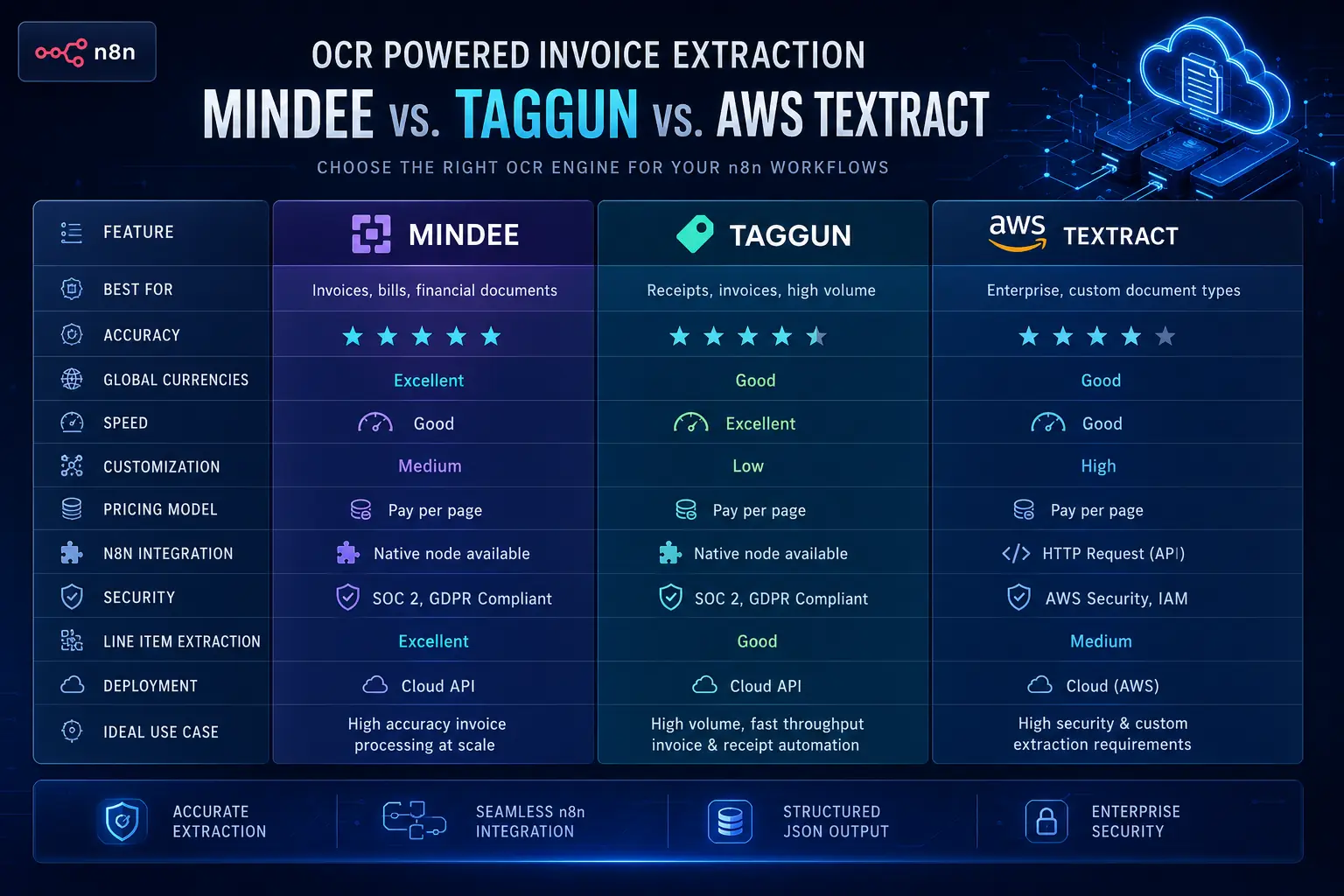
Picking the right OCR tool to bolt onto n8n is what makes or breaks this entire setup. Mindee brings a highly accurate, pre-trained invoice model to the table that handles global currencies incredibly well. Taggun is wildly fast and hyper-specialized for receipts and invoices.
AWS Textract? It’s locked down and secure, but expect to do a lot more heavy lifting to parse the raw data correctly. Some of these tools offer native nodes right inside n8n, making the whole setup as easy as pasting an API key.
For the rest, you’ll just default to the generic HTTP Request node. Lead developers usually prefer the HTTP node anyway, simply because it gives you absolute granular control over JSON mapping and auth headers.
Advanced Strategy: Error Handling & Scaling
If an API drops offline or a vendor sends a corrupted file, your workflow can’t just fail silently. That’s amateur hour. Enterprise-grade setups demand ruthless error handling. Put an Error Trigger node (often referred to as a “Catch” node) into a dedicated side workflow.
If your primary invoice pipeline breaks, this node catches the error payload and instantly pings your operations team in Slack or email. And when you hit the point where you’re processing thousands of global documents – especially during month-end close – you have to scale.
Leverage n8n queues by backing your self-hosted instance with Redis or RabbitMQ. This guarantees high-volume batch processing runs flawlessly without completely cooking your server memory. Oh, and always validate those incoming webhooks to keep your financial data on lockdown.
Case Study / Real Example
Take a mid-sized fintech firm we observed recently. They were drowning in a backlog of vendor invoices, which triggered late payment penalties and seriously frustrated their suppliers. Their manual data entry team flat-out couldn’t keep pace with the sheer global volume.
So, they ripped out the old process, spun up a self-hosted n8n instance, and wired it directly to the Mindee API. They engineered a custom workflow that intercepted emails, scanned the PDFs, scrubbed the text with custom regex, and shoved the clean data straight into Xero.
Result: Reduced processing time by 92% and cut software costs by $1,500/month.
Expert Framework
With over 5 years of hands-on experience building financial automation systems, I’ve worked with businesses to streamline invoice processing, automate reconciliation workflows, reduce manual reporting time, and integrate accounting platforms with CRM and ERP systems. My focus has always been on creating reliable, scalable automations that improve operational accuracy, strengthen financial visibility, and eliminate repetitive back-office tasks across growing organizations.
If you want to win at this level, I always push the “Ingest, Parse, Sync” methodology. First, lock down a bulletproof way to Ingest documents with zero human touch. Second, Parse that data leveraging a hybrid of AI-driven OCR and ruthless Regex rules.
Finally, Sync only the perfectly clean, validated JSON payloads into your ERP. Sticking rigidly to this three-step framework obliterates bottlenecks and guarantees your data integrity.
Common Mistakes in Invoice Automation
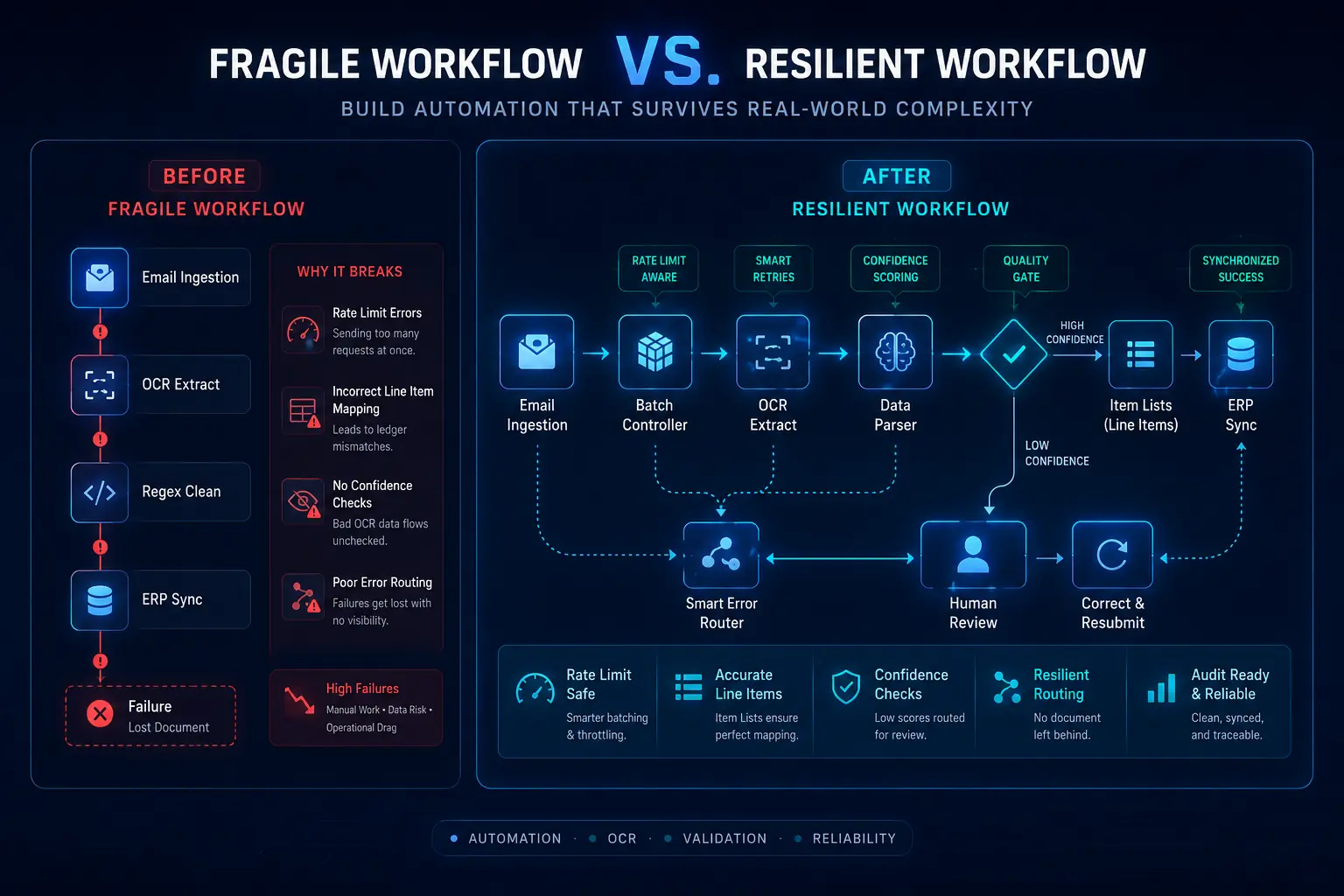
Even senior developers mess up financial document automation. The biggest rookie mistake? Completely ignoring API rate limits. If you slam your OCR tool with 500 invoices in a single second, the API will aggressively reject them.
The second massive error is failing to map line items properly, which immediately corrupts your accounting ledger. Third, never blind-trust 100% of your OCR output; you have to build IF nodes to catch low confidence scores and flag them for human review.
Finally, terrible error routing just leaves failed documents rotting in the system. Fix this by batching your requests, utilizing the Item Lists node for handling arrays, and always engineering a manual review fallback.
Future Trends / Strategic Insights
The future of invoice automation is blowing right past traditional OCR. We are already watching AI agents operate natively inside n8n workflows. Very soon, if a PO number is missing from a document, the workflow won’t just flag it, it will automatically draft and fire off an email to the vendor demanding it.
The whole industry is pivoting away from rigid, template-based OCR and moving toward LLM-based extraction. Large Language Models can actually read an invoice like a human being, grasping the context even if the formatting is a total disaster.
For fintechs and scaling B2B brands, getting in early on these self-hosted, AI-driven workflows builds a massive operational advantage. You create a proprietary data moat that competitors – who are still paying for expensive manual labor – simply cannot compete with.
Action Plan / Implementation Guide
Ready to actually build this? Here is your no-nonsense quick-start checklist to get your environment up and running today:
-
Spin up a self-hosted n8n instance via Docker.
-
Create a dedicated accounts payable email (e.g., invoices@yourcompany.com).
-
Grab an API key from either Mindee or Taggun.
-
Construct your first IMAP trigger node to catch incoming emails.
-
Test the entire workflow end-to-end using 5 historical invoices.
-
Prioritize getting clean data out of the OCR first. Do not even think about the ERP sync until your JSON payload is structured perfectly.
Conclusion
You do not have to settle for bloated software fees and painfully slow manual data entry. By leveraging a self-hosted n8n environment alongside heavy-hitting OCR tools and smart JSON routing, you can process massive volumes of invoices for a fraction of what it usually costs.
This approach hands you total data control, strips out human error, and frees your ops team to focus on scaling the business.
Ready to skip the trial and error entirely?
Automate invoice processing n8n FAQ
What is n8n?
n8n is an incredibly extensible, fair-code workflow automation platform. It lets you wire up different APIs and external services using visual nodes and custom code, so you can automate complex, enterprise-grade business processes without the friction.
Can n8n read PDF invoices?
Yes, absolutely. While it doesn’t parse them natively out of the box, you can easily bridge n8n to external OCR APIs like Mindee or Taggun to strip the text right out of the PDFs.
Is n8n free to use?
It operates on a fair-code license. You can actually self-host it for free for internal business use, making it ridiculously cost-effective. They do offer a paid cloud-hosted tier if you want to skip server management entirely.
What is the best OCR for invoices?
The heavy hitters right now are Mindee, Taggun, and AWS Textract. Mindee and Taggun deliver incredible out-of-the-box accuracy for financial data, while AWS gives you that deep, enterprise-level customization if you need it.
Do I need to know coding to use n8n?
Having a grasp on intermediate logic helps, but no, you don’t strictly need to be a developer. n8n packs plenty of low-code nodes. That said, knowing your way around basic JavaScript makes cleaning up messy data vastly easier.
How do I extract line items in n8n?
To pull out line items, take your OCR output and run it through the Item Lists node inside n8n. This specific node is built to split and manipulate JSON arrays, letting you map out individual items perfectly.
How do I connect n8n to my ERP?
You have two paths: use the native credential nodes (if you’re using something like Xero or QuickBooks), or drop in an HTTP Request node to fire authenticated API calls directly to your ERP’s backend.
Can n8n trigger from an email attachment?
It certainly can. Just deploy the native IMAP node to watch a specific inbox. The exact second an email lands with a PDF attached, it kicks off the entire workflow.
How do I clean OCR data in n8n?
You scrub OCR data by leveraging the Code node. By writing a few lines of JavaScript and Regular Expressions (Regex), you can instantly format weird dates, kill extra spaces, and strip away random currency symbols.
What is a JSON payload in invoice processing?
Think of a JSON payload as the structured, text-based package that holds all your extracted invoice data. It is the standardized format n8n uses to hand off that clean data to your ERP system.
How do I handle failed OCR reads in n8n?
You manage failed reads by building IF nodes tied directly to the OCR engine’s confidence scores. If that score drops too low, the workflow automatically routes the document into a Slack channel so a human can review it.
How to set up multi-step approval workflows?
You build multi-step approvals by injecting Webhook nodes. You can literally pause a workflow mid-flight, wait for a department manager to hit an “Approve” button inside Slack or Microsoft Teams, and then let it continue.
How do I fix JSON mapping errors?
Fix these mapping errors by double-checking your data types (ensuring strings aren’t acting like numbers) right inside the Code node. Also, verify that you are using the correct dot notation when referencing values buried in nested arrays.
Can I use regex in n8n to find PO numbers?
Yes, you absolutely can. For instance, if you open up a JavaScript Code node, you can write const po = rawText.match(/PO-\d{5}/); to instantly hunt down and extract a highly specific Purchase Order format.
How do I scale n8n for high-volume invoice processing?
To really scale for high volumes, you have to switch over to queue mode. Back your instance with Redis or RabbitMQ to manage your worker nodes. This lets your infrastructure process hundreds of invoices concurrently without crashing the system.
